PegaDescarga

Download TikTok MP3: save the audio of any public video

Paste the link to a TikTok video and get just the sound as an MP3 file, without installing anything.

To download TikTok MP3 you don't have to convert the video yourself. The tool takes the audio from the public video you choose and gives it to you as an MP3 file that opens on any phone, computer or player.

Audio only

A small file, without the video picture, that you can listen to before downloading.

MP3 format

Plays on iPhone, Android, Windows and Mac.

No sign-up

You don't need an account on this site or on TikTok.

In the browser

No apps or extensions.

How to download TikTok MP3 in 3 steps

  1. 1

    Copy the video link

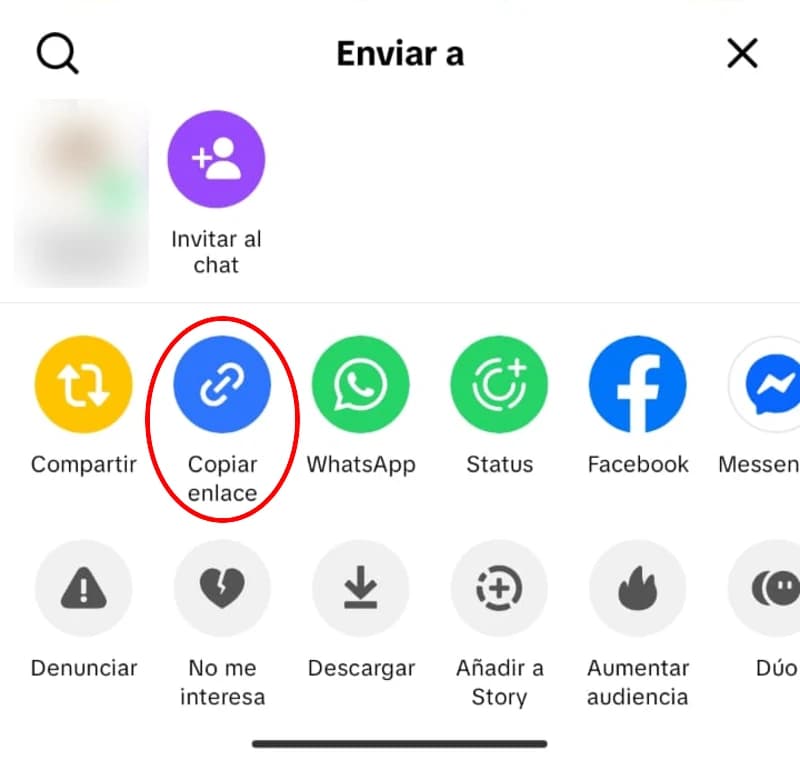
    Open the video with the sound you want on TikTok. Tap the share button (the arrow) and choose Copy link. On a PC, copy the address from the browser bar.

    Copy link option in the Share menu of a TikTok video
  2. 2

    Choose MP3 and paste the link

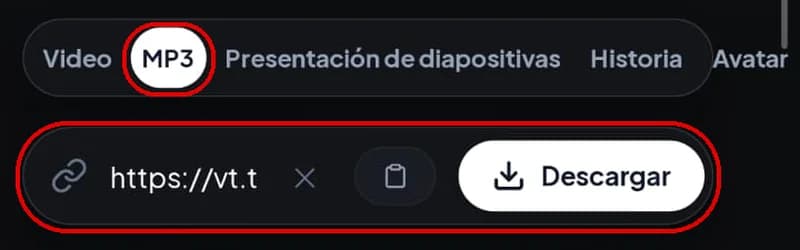
    Above, choose the MP3 tab and paste the link into the box, or use the Paste button. Then tap Download. You'll see a preview with a player so you can listen to the audio before saving it.

    MP3 tab selected and a TikTok link pasted into the tool
  3. 3

    Save the file

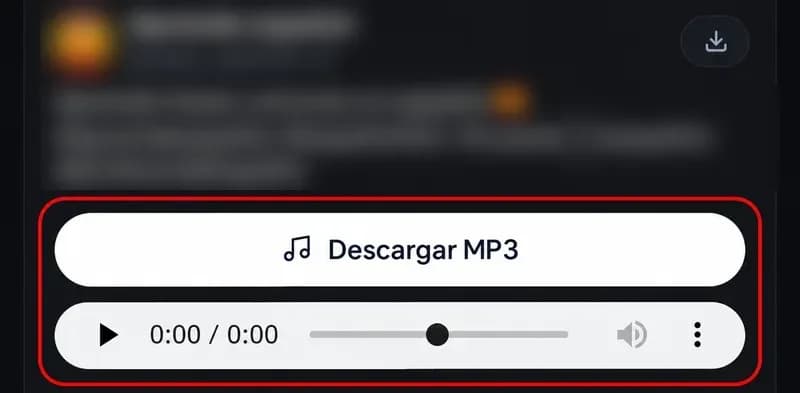
    Tap Download MP3. Once you download the TikTok MP3, the file is saved to your browser's downloads folder. It's named after the video's caption. Further down we explain where to find it on each device.

    Download MP3 button to save the audio of a TikTok video

Four ways to save TikTok audio

TikTok doesn't let you download audio as a file from the app. These are the real options and what you get with each one:

Add the sound to Favorites on TikTok

Do you get an MP3?
No
What happens
The sound stays saved inside the app for your own videos, but it never leaves TikTok.

TikTok's Download button

Do you get an MP3?
No
What happens
You save the whole video with its audio and with a watermark. It only appears if the creator allows downloads.

Extract the audio with CapCut

Do you get an MP3?
Yes, with extra steps
What happens
You download the video, open it in CapCut, use Extract audio and export. Handy if you are editing anyway.

This tool

Do you get an MP3?
Yes
What happens
You paste the link, listen to the audio and download the MP3 directly.

If you only want to use a sound in your own TikTok, Favorites is enough. If you need the file to listen offline, set it as a ringtone or edit it, the most direct way is to download the TikTok MP3 with the tool above.

What quality is the MP3?

When you download TikTok MP3 here, the audio comes from the same track TikTok stores for the video, usually at 128 kbps. In a November 2026 test, the MP3 came out exactly like that: 128 kbps, 44.1 kHz and stereo. That's good quality for voices and for listening to music on your phone with regular headphones.

No tool can give you more quality than TikTok has stored. A "320 kbps" MP3 made from a 128 kbps source is just bigger, it doesn't sound better.

For reference, a 128 kbps MP3 takes about 1 MB per minute. A 30-second sound is around half a megabyte.

What about the watermark? Audio doesn't have one: TikTok's watermark is the logo and username shown over the picture. When you download TikTok audio without watermark you get just the sound, with nothing added.
Bitrate
128 kbps
Sample rate
44.1 kHz
Channels
Stereo
Per minute
~1 MB

Where to find the downloaded MP3

When you download TikTok MP3 from the browser, the file doesn't go to your music app: it stays in the downloads folder.

iPhone

Safari saves it in the Files app, inside Downloads. It doesn't appear in the Music app, but from Files you can play, move or share it.

Android

It stays in the Downloads folder. Open it with your file manager or any music player.

PC

It's in your browser's Downloads folder (Chrome, Edge or Firefox).

Use the audio as a ringtone or alarm

Many people download TikTok MP3 to use a sound as a ringtone or alarm. The process depends on your phone.

On Android

On most phones, go to Settings, then Sound (or Sounds and vibration) and then Ringtone. There you can add a ringtone from your files and pick the MP3 from Downloads. For an alarm, open the Clock app, edit the alarm and change the sound to the file. Menu names vary a little by brand.

On iPhone

On iOS 26 or later you can use the MP3 directly: open it in the Files app, tap the share button and choose the option to use it as a ringtone. The audio must be 30 seconds or less. On earlier versions you need GarageBand, Apple's free app: import the MP3 from Files, trim it to 30 seconds or less and export it as a ringtone. In both cases, you'll then find it in Settings under Sounds, and you can also pick it as an alarm sound in the Clock app.

Common problems

If something goes wrong when you download TikTok MP3, it's almost always one of these causes.

On iPhone it says it can't be downloaded

Press and hold the download button and choose Download Linked File. Then look for the MP3 in Files, inside Downloads.

The MP3 is silent or a different song plays

TikTok removes or mutes some songs for copyright reasons. If the video is also silent or sounds different in the app, the MP3 will come out the same way.

The link doesn't work

For audio you need the link to a video or a photo post. If you paste a profile link, the tool switches to the stories option on its own. Also remember that only posts from public accounts that are still on TikTok work.

Sounds and copyright

Many TikTok sounds are copyrighted songs. Downloading TikTok music to listen to yourself or to use as a personal ringtone is not the same as posting it again. To use a song in a public video or a project, it has to be yours or you need permission from whoever holds the rights. Original sounds you created yourself you can save and reuse however you like.

Frequently asked questions

Is it free to download TikTok MP3 here?

Yes. You don't pay anything and you don't need to sign up.

How do I convert TikTok audio to MP3?

Copy the video link, paste it into the MP3 tab and tap Download MP3. You don't need another TikTok to MP3 converter or any app.

How do I save a TikTok sound to Files?

On iPhone, MP3s you download with Safari go straight to Files, in the Downloads folder. From there you can move them to another folder or to iCloud Drive.

Can I download just the audio without the video?

Yes. When you download TikTok MP3 you get only the sound, without the picture. If you also want the video, use the TikTok video downloader.

Does it work with photo posts?

Yes. Paste the photo post link into the MP3 tab and you'll get its music as an MP3, just like with a video. To save the images, use download TikTok photos.

Can I download it at 320 kbps?

The MP3 comes out at the quality TikTok has stored, usually 128 kbps. Raising that number doesn't improve the sound.

Can I download the audio of a private video?

No. Only videos from public accounts work.