PegaDescarga

Download TikTok videos without watermark

Paste the video link and save it in HD without watermark, from any browser.

To download TikTok videos, all you need is the link to the post. The tool above processes it and gives you the file ready to save, without the watermark TikTok adds to its own downloads.

No watermark

The video comes out without the TikTok logo or the username on top.

HD or with watermark

Download the clean HD version or, if you prefer, the version with the TikTok watermark.

No sign-up

You don't need an account on this site or to log in to TikTok.

No app

Works in the browser on your iPhone, Android or PC.

How to download TikTok videos in 3 steps

  1. 1

    Copy the video link

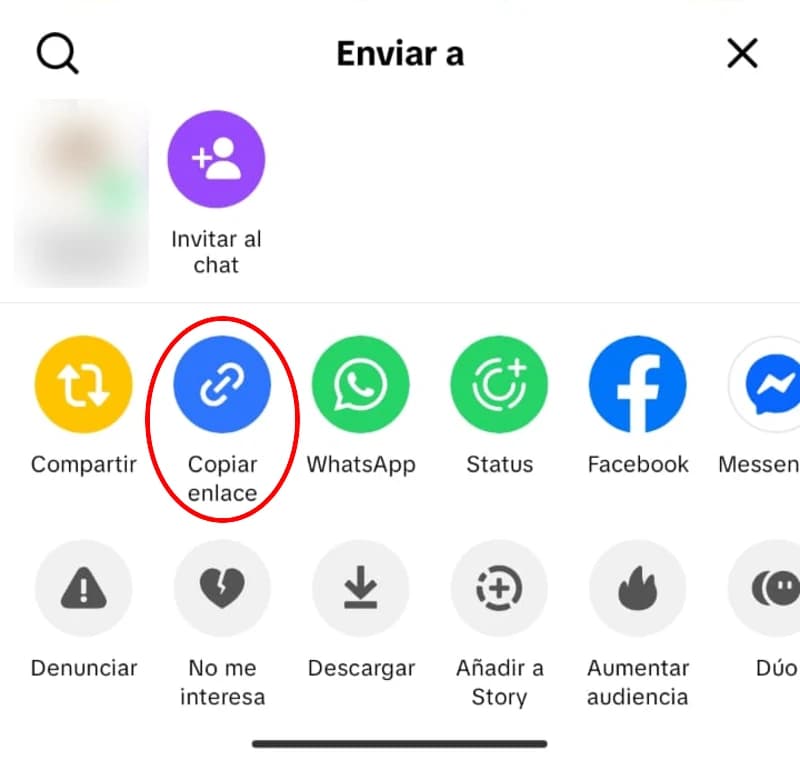
    Open the video in the TikTok app, tap the share button (the arrow on the right) and choose Copy link. If you use TikTok on a PC, the address shown in the browser bar works too.

    TikTok share menu with the Copy link option highlighted
  2. 2

    Paste the link into the tool

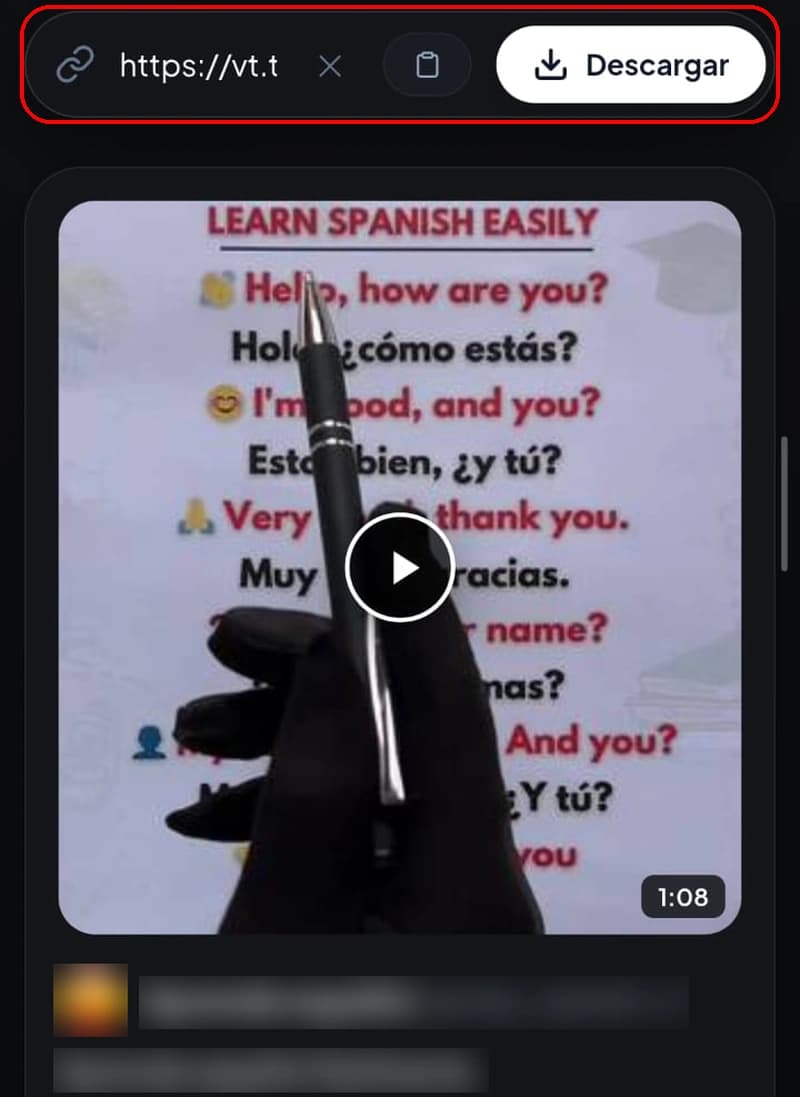
    Tap the box above and paste the link, or use the Paste button (the clipboard icon). Then tap Download. Both long links (www.tiktok.com/@user/video/...) and the short ones the app gives you (vt.tiktok.com) work. Before downloading, you'll see a preview with the length and details of the video, so you can confirm it's the right one.

    If you paste a different kind of link, such as a photo post or a profile, the tool switches to the matching option on its own.

    TikTok link pasted into the download tool box
  3. 3

    Choose the version and download

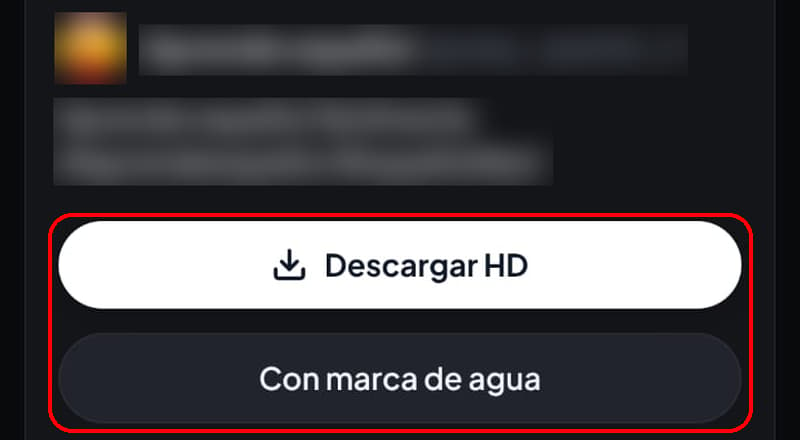
    Tap Download HD for the video without watermark, or With watermark if you prefer the version with the TikTok logo. The file is saved to your browser's downloads folder and is named after the video's caption.

    Buttons to download a TikTok video in HD or with watermark

Download TikTok without watermark: what changes in the file

When you save a video with the TikTok button, the app adds its logo and the username of whoever posted it, and that mark moves from one corner to another during the video. Also, that option only appears if the creator allows downloads on their account.

With this tool you get the video without that watermark: same picture, same audio, no logo on top. It's useful for watching it without distractions, editing a clip of your own or keeping a clean copy of your own posts.

If you want to save all your own videos

TikTok lets you request a copy of your account data, which includes your posts, from Settings and privacy. The copy isn't ready right away: it can take a few days. For a single video, the tool above is faster.

TikTok's button or this tool?

There are two ways to download TikTok videos: the Download button in the app itself or a web tool like this one. Each is good for something different.

Watermark

TikTok's Download button
Yes, logo and username
This tool
No, or yes if you choose the watermarked version

Do you need TikTok?

TikTok's Download button
Yes, the app or the website with your account
This tool
No

Quality

TikTok's Download button
Whatever the app gives you
This tool
HD (720 × 1280 in our test)

Audio only (MP3)

TikTok's Download button
No
This tool
Yes

Where the file goes

TikTok's Download button
Your phone's gallery
This tool
Your browser's downloads folder

To send a quick video to a friend, the app's button is enough, and the watermark makes it clear who made it. If you want clean TikTok videos, in HD or just the audio, use the tool.

Formats and quality: HD, with watermark and MP3

  • HD MP4 without watermark: the highest-quality version the tool gives you, with no logo on top. This is the recommended option.
  • MP4 with watermark: the same version TikTok's button gives you, with the logo and username. More details in download TikTok videos with watermark.
  • MP3: just the audio, from the MP3 tab. It has its own page: download TikTok MP3.

The difference between the two video versions is noticeable. In a November 2026 test with a 47-second video, the HD download came out at 720 × 1280 with 96 kbps audio, and the watermarked version at 576 × 1024 with 32 kbps audio. In other words, more resolution and much clearer sound in the HD version.

The maximum quality depends on the original video. If the creator uploaded it in low resolution, no tool can give you more: a file labelled "4K" made from a small video is just bigger, it doesn't look better.

Looking for a TikTok to MP4 converter? There's nothing to convert. TikTok already stores its videos as MP4 and the tool downloads that file directly, which is why it takes seconds and doesn't lose quality.

Where is the downloaded video saved?

When you download TikTok videos from the browser, the file doesn't go straight to your gallery like it does with the app: it lands in the downloads folder first.

Android

It goes to the Downloads folder and usually shows up in Gallery or Google Photos.

iPhone

Safari saves it in the Files app, inside Downloads. To move it to Photos, open the video, tap the share button and choose Save Video.

PC

It ends up in your browser's Downloads folder (Chrome, Edge or Firefox). You can change that folder in the browser settings.

Common problems and how to fix them

Almost every failed TikTok download comes from a badly copied link or a video that is no longer public.

"The link is not valid"

Most often, extra text was pasted along with the link, or the link is incomplete. Copy it again from Share and check that it contains "tiktok.com".

The video is private or was deleted

Only public videos can be downloaded. If the account is private or the creator deleted the video, the tool can't access it.

I pasted a profile link

With a profile link, the tool doesn't look for a video: it switches to the stories option on its own and shows the ones that account has active. If you want a video, copy the link from the video itself.

I downloaded the video but it's not in my gallery

On iPhone, look in Files > Downloads and save it to Photos from the share button. On Android, check the Downloads folder in your file manager; sometimes Gallery takes a few seconds to show it.

Safari doesn't download the file

When Safari asks whether you want to download the file, tap Download. If the video opens in another tab instead, go back, press and hold the download button and choose Download Linked File.

The video has no sound

Some videos lose their audio when TikTok removes a song for copyright reasons. If the video is also silent on TikTok, the downloaded file will be too.

The download keeps loading

Reload the page and paste the link again. If nothing changes, open the video on TikTok to confirm it still exists and that the account is still public.

The file won't play

The HD version uses a newer compression format (HEVC, also called H.265), which gives more quality in less space. Some older players can't open it, and on Windows the Photos app may ask you for an extension from the Microsoft Store. Try a player such as VLC, or download the watermarked version, which uses H.264 and opens on almost any device.

How to stay safe on download sites

Many TikTok download sites fill the screen with ads that have buttons made to look like download buttons. A few simple rules save you trouble:

  • Only tap the button that appears inside the tool after you paste the link.
  • You don't need to install anything to download TikTok videos. If a page asks you for an app or an extension, close it.
  • Don't accept browser notifications you didn't ask for.
  • Check the file: a video ends in .mp4, audio in .mp3 and a photo in .jpg. If you get an .exe or an .apk, delete it without opening it.

Responsible use

Videos belong to the people who make them. Download them to watch yourself, to keep your own posts or when you have the creator's permission. If you want to repost a video that isn't yours, ask for permission first and credit its author. This tool doesn't download private content.

If you're a creator: decide who downloads your videos

Whether others can download TikTok videos from your account with the app's button depends on a single setting. On your Profile, open the menu, go to Settings and privacy, then Privacy and then Downloads. That's where you turn video downloads on or off.

  • When you turn it off, the change applies to your earlier videos and to the ones you post later.
  • Copies someone saved before the change stay on their device.
  • On private accounts and accounts of people under 16, the option is off and cannot be turned on.

If a video shouldn't leave your circle, post it as private: this tool only downloads public videos.

Frequently asked questions

Is it free to download TikTok videos here?

Yes. You don't pay anything and you don't need to create an account.

Do I need to install an app or an extension?

No. The tool works in the browser, both on your phone and on your PC.

Can I download TikTok videos in HD?

Yes. The Download HD button gives you the video in HD and without watermark. In our test it came out at 720 × 1280. The final resolution depends on how the creator uploaded it.

Can I download private videos?

No. Only videos from public accounts work.

Does it work for TikTok reels?

Yes. On TikTok, "reels" are regular videos, so you download them with the same three steps.

I don't see the Copy link option, what do I do?

When you tap Share, swipe the row of options sideways: Copy link is usually among the first icons. On a PC, copy the video address from the browser bar.

Is it legal to download TikTok videos?

It depends on how you use them and on the laws of your country. Saving a video to watch yourself is not the same as posting it again: for that you need permission from whoever made it.